 Support Center
Desktop Icon "Browses for a Program"
📚 What This Guide Covers
This guide explains what it means when a desktop icon “browses for a program” and how to reconnect a broken network shortcut.
📊 Step-by-Step Guide
Step 1: Understand the issue
In regards to a network installation, when a desktop icon browses for a program, this means the shortcut link is broken.
Step 2: Open This PC
To fix - go inside any File Folder then on the left-hand side click on This PC
Step 3: Reconnect the disconnected network drive
Look for a networked drive that has a big Red X on it. Double click the icon for that disconnected drive. If the Red X turns to a Green, your connection has been re-established again. If it stays red, there is something wrong with your network.
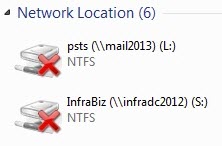
You will need to address your network issue before the icon can re-connect and work properly.
📞 Still Need Help?
If you are having trouble, contact our support team:
Phone: 1-800-516-9442
Tags: install,setup,getting-started