 Support Center
How do I process SureFire acknowledgements if they are greyed out?
🔍 How do I process SureFire acknowledgements if they are greyed out?
This guide will help you fix greyed-out SureFire acknowledgement files so you can process them.
⚠️ Before You Begin
You will need access to the drive where SureFire is installed.
Tip: The path uses:
- ? = the drive on which SureFire is installed
- xx = the 2-digit year
📊 Step-by-Step Guide
-
Step 1: Open the SureFire UTSxx folder
Use this when you need to access the folder where acknowledgement files are stored.
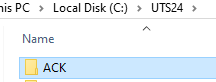
Open ?:\UTSxx. (where ? is the drive on which SureFire is installed and xx is the 2-digit year).
-
Step 2: Open the ACK or RAL folder
Use this when you need to find the acknowledgement file that is greyed out.
Open the ACK or RAL folder.
-
Step 3: Locate the greyed-out acknowledgement file
Use this when you need to identify the specific file SureFire is showing as greyed out.
Locate the acknowledgement file that is appearing grey in SureFire.
-
Step 4: Rename the file extension from .ACKI to .ACKU
Use this when you need to change the file so SureFire can process it.
Right-click the acknowledgement file and rename from .ACKI to .ACKU.
✅ Success!
You can now process your acknowledgements.
📝 Notes
EFC, IRS, and State Ack files are located in ?:\UTSxx\ACK
Bank ack files are located in ?:\UTSxx\RAL.
📞 Still Need Help?
If you are having trouble, contact our support team:
Phone: 1-800-516-9442
Tags: install,setup